| Area | Power Supply 8A with Monitoring Board (C200440) | Power Supply 3.5A (C200340) |
|---|---|---|
| Install note | 3E0714 | 3E3717 |
| Input voltage | 100-240 V AC (3 A slow-blow fused) | 90-250 V AC |
| Primary output | 13.8 V DC (primary) + 13.3 V DC (auxiliary, 1 A) | 13.8 V DC |
| Output current | 8 A (7 A primary + 1 A auxiliary) | 3.5 A |
| Power rating | 150 W | 51.38 W |
| Battery charging current | 0.5 A (independent of other outputs) | 0.23 A max |
| Max battery capacity | 4 x 7 Ah (28 Ah total) | 2 x 7 Ah (14 Ah total) |
| Alarm outputs | Battery low, mains fail | Battery low, mains fail |
| Alarm output type | Jumper-selectable: open/closed or 4-state 4k7 ohm terminated | Open collector, 4k7 EOL fitted |
| Battery low threshold | ~11.4 V | ~10.8 V |
| Mains fail threshold | <87 V or >259 V AC | <90 V or >250 V AC |
| Operating temperature | -10°C to +50°C | -10°C to +50°C |
| Dimensions (H x W x D) | 265 x 110 x 40 mm | 263 x 103 x 40 mm |
| Typical cabinet | Gallagher Dual Cabinet (C200104/C200105) | Standard Gallagher Cabinet |
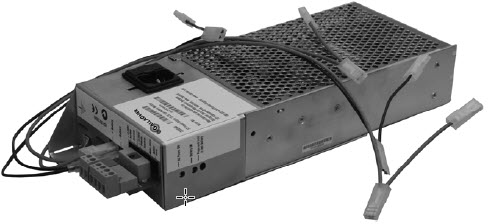 This is found in the Dual Cabinet or can be ordered separately. **They cannot be used in the Starter Kit or 2 Door Controller Cabinets, they do not fit.**
### Low Battery / AC Fail Resistors
Current versions have a fixed set of internal resistors for connecting to a controller to detect Power and Low Battery signals, and **they cannot be altered**. Use of the jumpers can allow the resistor values to be altered, see the install note supplied with the power supply. To use different terminating resistors, use the un-terminated jumper position, then add the resistors you need to the circuit.
Older versions do not have jumpers and are fixed in the resistor values.
The power supply will deliver 8 A on the primary output (this includes the fused 1 A output).
Batteries connected to the Battery terminals are monitored by the charging circuit, and the power supply will attempt to keep the battery at a charged state. Maximum current draw from the battery output to charge the battery is **0.5 A**.
It is designed for a **maximum of four 7 Ah 12 V batteries** connected, so a maximum of about 28 Ah capacity. **It cannot maintain a charge of a larger set of batteries.** It would never be able to fully recharge a 40 Ah battery, for example, because the maximum charge current is insufficient to charge the battery in a reasonable time.
There is a discharge time on the mains detection circuitry that may cause a time delay of up to **10 seconds** between a mains dropout and the generation of an alarm and a change in LED.
The mains fail alarm is triggered when the mains voltage falls below approximately **90 V** or rises above approximately **250 V**.
There is an auxiliary power output port on the 8 A power supply, fused at **1 A**. If the output does not have any voltage present, the fuse is likely to have blown and will have to be replaced.
> ⚠️ **Remember:** the newer board has an added capacitor in it, so taking out the fuse may still indicate a voltage reading, which will slowly dissipate.
### Startup and operating notes
* Two LEDs indicate mains supply status and battery voltage visually.
* The battery charge circuit has a delayed start. It may not begin charging until **60 seconds** after power-on.
* The battery low output is latched under normal operation. It switches to continuous check mode, every **8 seconds**, when mains fails.
* After replacing a battery, press the battery test button for about **20 seconds** to reset the low battery alarm.
Install note: 3E0714 Install Note Gallagher Power Supply (with Monitoring Board).
## Power Supply - 3.5 Amp (C200340)
This is found in the Dual Cabinet or can be ordered separately. **They cannot be used in the Starter Kit or 2 Door Controller Cabinets, they do not fit.**
### Low Battery / AC Fail Resistors
Current versions have a fixed set of internal resistors for connecting to a controller to detect Power and Low Battery signals, and **they cannot be altered**. Use of the jumpers can allow the resistor values to be altered, see the install note supplied with the power supply. To use different terminating resistors, use the un-terminated jumper position, then add the resistors you need to the circuit.
Older versions do not have jumpers and are fixed in the resistor values.
The power supply will deliver 8 A on the primary output (this includes the fused 1 A output).
Batteries connected to the Battery terminals are monitored by the charging circuit, and the power supply will attempt to keep the battery at a charged state. Maximum current draw from the battery output to charge the battery is **0.5 A**.
It is designed for a **maximum of four 7 Ah 12 V batteries** connected, so a maximum of about 28 Ah capacity. **It cannot maintain a charge of a larger set of batteries.** It would never be able to fully recharge a 40 Ah battery, for example, because the maximum charge current is insufficient to charge the battery in a reasonable time.
There is a discharge time on the mains detection circuitry that may cause a time delay of up to **10 seconds** between a mains dropout and the generation of an alarm and a change in LED.
The mains fail alarm is triggered when the mains voltage falls below approximately **90 V** or rises above approximately **250 V**.
There is an auxiliary power output port on the 8 A power supply, fused at **1 A**. If the output does not have any voltage present, the fuse is likely to have blown and will have to be replaced.
> ⚠️ **Remember:** the newer board has an added capacitor in it, so taking out the fuse may still indicate a voltage reading, which will slowly dissipate.
### Startup and operating notes
* Two LEDs indicate mains supply status and battery voltage visually.
* The battery charge circuit has a delayed start. It may not begin charging until **60 seconds** after power-on.
* The battery low output is latched under normal operation. It switches to continuous check mode, every **8 seconds**, when mains fails.
* After replacing a battery, press the battery test button for about **20 seconds** to reset the low battery alarm.
Install note: 3E0714 Install Note Gallagher Power Supply (with Monitoring Board).
## Power Supply - 3.5 Amp (C200340)
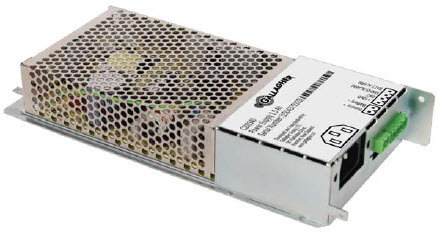 This is found in the Starter Kit or 2 Door Controller Cabinets, or can be ordered separately.
### Low Battery / AC Fail Resistors
This power supply **does not have internal jumpers** like the 8 A power supply to change the monitoring resistors. They are **fixed at 4k7 ohms and cannot be changed**.
This has a maximum charging capacity to charge and maintain **two 7 Ah batteries**.
The battery low alarm is triggered when the battery charge falls below approximately **12.25 V**.
> ⚠️ **If no battery is connected, the battery low alarm will not activate.**
The mains fail alarm is triggered when the mains voltage falls below approximately **90 V** or rises above approximately **250 V**.
Install note: 3E3717 Install Note Gallagher Power Supply 3.5A.
## Cabinet Battery Capacity
This is for the Gallagher Cabinets only, and for **12 V 7 Ah batteries only**.
| Cabinet Description | Battery Capacity |
| ------------------- | ---------------- |
| Dual Cabinet | up to 4 |
| Starter Kit | up to 2 |
| 2 Door Cabinet | 1 |
| FT Cabinet | none |
## Monitoring the Mains Fail and Low Battery
### Connecting Mains Fail and Low Battery to I/O hardware
The 8 A and 3.5 A power supplies come with a monitoring circuit that monitors the Mains Fail and the Low Battery status of the power supply. Connecting these to the Gallagher hardware is simple.
The Mains Fail and the Low Battery outputs have a pre-configured resistor setup for the default values of **4,700 ohms**.
Since the power supply should be powering the Gallagher hardware, it will be sharing a common ground with the power supply. This means the Mains Fail and Low Battery **can be directly connected to an input on the Gallagher hardware without any external resistors**.
If you are using different resistors, you will need to change the jumper settings from their default setting of 4k7 to **Unterminated**.

Above is the wiring diagram in the install note for the 8 A power supply.
This is found in the Starter Kit or 2 Door Controller Cabinets, or can be ordered separately.
### Low Battery / AC Fail Resistors
This power supply **does not have internal jumpers** like the 8 A power supply to change the monitoring resistors. They are **fixed at 4k7 ohms and cannot be changed**.
This has a maximum charging capacity to charge and maintain **two 7 Ah batteries**.
The battery low alarm is triggered when the battery charge falls below approximately **12.25 V**.
> ⚠️ **If no battery is connected, the battery low alarm will not activate.**
The mains fail alarm is triggered when the mains voltage falls below approximately **90 V** or rises above approximately **250 V**.
Install note: 3E3717 Install Note Gallagher Power Supply 3.5A.
## Cabinet Battery Capacity
This is for the Gallagher Cabinets only, and for **12 V 7 Ah batteries only**.
| Cabinet Description | Battery Capacity |
| ------------------- | ---------------- |
| Dual Cabinet | up to 4 |
| Starter Kit | up to 2 |
| 2 Door Cabinet | 1 |
| FT Cabinet | none |
## Monitoring the Mains Fail and Low Battery
### Connecting Mains Fail and Low Battery to I/O hardware
The 8 A and 3.5 A power supplies come with a monitoring circuit that monitors the Mains Fail and the Low Battery status of the power supply. Connecting these to the Gallagher hardware is simple.
The Mains Fail and the Low Battery outputs have a pre-configured resistor setup for the default values of **4,700 ohms**.
Since the power supply should be powering the Gallagher hardware, it will be sharing a common ground with the power supply. This means the Mains Fail and Low Battery **can be directly connected to an input on the Gallagher hardware without any external resistors**.
If you are using different resistors, you will need to change the jumper settings from their default setting of 4k7 to **Unterminated**.

Above is the wiring diagram in the install note for the 8 A power supply.
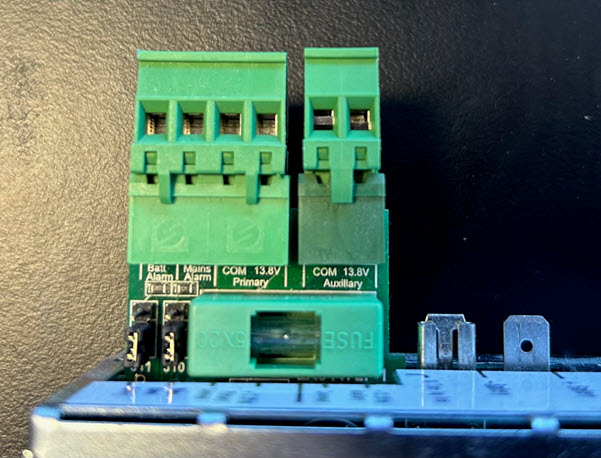 Above is the 8 A power supply output connection. Note the outputs for the Mains Fail and the Low Battery.
If you are using the default resistor settings of dual 4k7 ohms, these outputs can be connected directly to 2 separate inputs on the Gallagher I/O hardware, assuming they are sharing the same common ground.
### Testing the Low Battery and Mains Fail
**Testing Mains Fail:**
1. Connect a working battery to the Battery terminals of the power supply.
2. Pull the mains power to the power supply.
3. The input connected to the Mains Fail output should be triggered within 10 seconds or so.
**Testing Low Battery** is a little harder. You need to bring the battery voltage to **below 12.25 V**. **Simply unplugging the battery will not achieve a Low Battery event.** You essentially have to connect a dead battery to the Battery terminals to bring the voltage down to the low battery detection threshold.
> ⚠️ **Disconnecting the battery does not simulate a low battery.** It cuts the monitoring circuit instead, so no alarm fires. Use a dead battery, or a regulated low-voltage source on the bench, to actually cross the threshold.
***
🔗 **Related**
* [Seperate Power Supplies](/knowledge-hub/products/cc-hardware/cabinets-and-power/seperate-power-supplies.md). Powering Gallagher devices from a second or third-party supply, and the common-ground rule that goes with it.
* [Cabinets and Power](/knowledge-hub/products/cc-hardware/cabinets-and-power.md). The cabinet range these power supplies fit.
* [Input and Output (IO) Devices](/knowledge-hub/products/cc-hardware/input-and-output-io-devices.md). The I/O hardware the Mains Fail and Low Battery outputs connect to.
---
# Agent Instructions
This documentation is published with GitBook. GitBook is the documentation platform designed so that both humans and AI agents can read, navigate, and reason over technical content effectively. Learn more at gitbook.com.
## Querying This Documentation
If you need additional information that is not directly available in this page, you can query the documentation by asking a question.
Perform an HTTP GET request on the following URL with the `ask` and `goal` query parameters:
```
GET https://help.security.gallagher.com/knowledge-hub/products/cc-hardware/cabinets-and-power/gallagher-power-supplies-how-to-guides.md?ask=
Above is the 8 A power supply output connection. Note the outputs for the Mains Fail and the Low Battery.
If you are using the default resistor settings of dual 4k7 ohms, these outputs can be connected directly to 2 separate inputs on the Gallagher I/O hardware, assuming they are sharing the same common ground.
### Testing the Low Battery and Mains Fail
**Testing Mains Fail:**
1. Connect a working battery to the Battery terminals of the power supply.
2. Pull the mains power to the power supply.
3. The input connected to the Mains Fail output should be triggered within 10 seconds or so.
**Testing Low Battery** is a little harder. You need to bring the battery voltage to **below 12.25 V**. **Simply unplugging the battery will not achieve a Low Battery event.** You essentially have to connect a dead battery to the Battery terminals to bring the voltage down to the low battery detection threshold.
> ⚠️ **Disconnecting the battery does not simulate a low battery.** It cuts the monitoring circuit instead, so no alarm fires. Use a dead battery, or a regulated low-voltage source on the bench, to actually cross the threshold.
***
🔗 **Related**
* [Seperate Power Supplies](/knowledge-hub/products/cc-hardware/cabinets-and-power/seperate-power-supplies.md). Powering Gallagher devices from a second or third-party supply, and the common-ground rule that goes with it.
* [Cabinets and Power](/knowledge-hub/products/cc-hardware/cabinets-and-power.md). The cabinet range these power supplies fit.
* [Input and Output (IO) Devices](/knowledge-hub/products/cc-hardware/input-and-output-io-devices.md). The I/O hardware the Mains Fail and Low Battery outputs connect to.
---
# Agent Instructions
This documentation is published with GitBook. GitBook is the documentation platform designed so that both humans and AI agents can read, navigate, and reason over technical content effectively. Learn more at gitbook.com.
## Querying This Documentation
If you need additional information that is not directly available in this page, you can query the documentation by asking a question.
Perform an HTTP GET request on the following URL with the `ask` and `goal` query parameters:
```
GET https://help.security.gallagher.com/knowledge-hub/products/cc-hardware/cabinets-and-power/gallagher-power-supplies-how-to-guides.md?ask=