> For the complete documentation index, see [llms.txt](https://help.security.gallagher.com/command-centre/llms.txt). Markdown versions of documentation pages are available by appending `.md` to page URLs; this page is available as [Markdown](https://help.security.gallagher.com/command-centre/command-centre-web-releases/2023/march.md).
# March
**Date Released:** 01/03/2023
### New Feature - Cardholder Onboarding Wizard
You are now able to fully create cardholders through the onboarding wizard in Command Centre Web on desktop browsers. Users are guided through the creation journey where they can choose to assign access, populate relevant Personal Data Fields, and issue credentials to the cardholder.

At the end of the wizard, you can view a summary of the cardholder and if needed make changes before saving it to the server. To make changes to any information, simply select the edit ‘pencil’ to be taken back to the appropriate page, or use the progress bar at the top to go back. \
\
This summary page is also optimized from printing if required.

### **New Feature - Copy Access from another Cardholder**
With this release of Command Centre Web, we now support the ability to copy access groups from another cardholder on desktop. This means that if you have a cardholder requiring the same access as another, you are able to copy these over to the cardholder, rather than searching for them individually.
The copy access feature is also available via the onboarding wizard.

### Enhancements
#### **Access Group Division Filter**
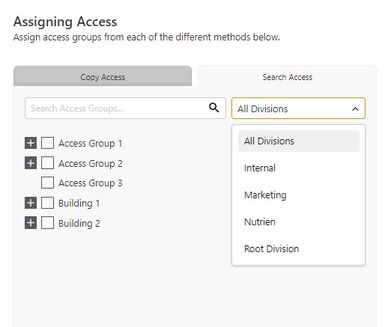
Support has been added to filter access groups when searching by a specific division.
*Note: Operators require the ‘View Site’ privilege to view the divisions.*
#### **Assign Access layout update**
To better utilize the available screen space, we have removed the modal window for assigning access, and now use the whole page to display this, allowing you to see more access groups on the screen.
You can now also modify the access groups' start and end dates as part of the assigned journey, before populating the PDFs. This means you can now fully assign access groups in one step on the cardholder.

#### **Issue Credentials layout update**
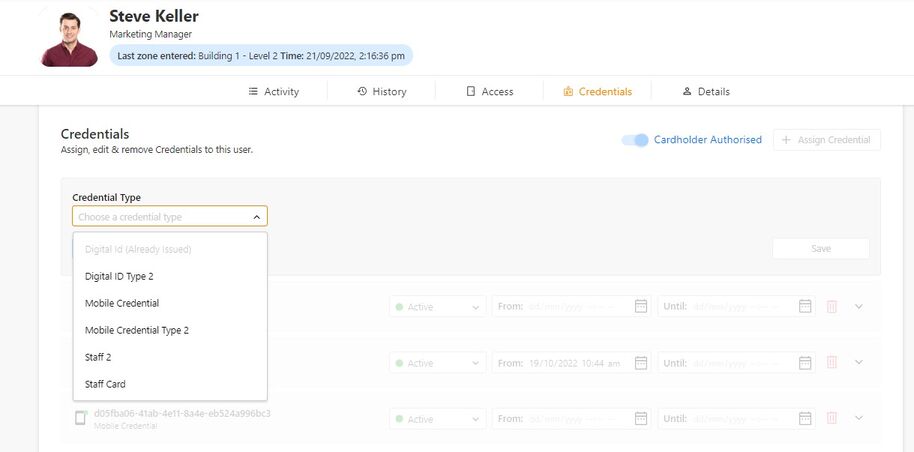
We updated the layout when assigning credential to now be inline on the page. This means you can now issue, modify and remove credentials, all from within the same page.
<
#### **Inactive Credentials**
Inactive credentials are now grouped together in the credentials tab of the cardholder, allowing you to easily see which credentials are active and inactive.

#### **Notification Banners**
We have made a change to the banner design, so that they no longer take up the full width of the screen. This allows you to still interact with the page, without the banner being in the way.

---
# Agent Instructions
This documentation is published with GitBook. GitBook is the documentation platform designed so that both humans and AI agents can read, navigate, and reason over technical content effectively. Learn more at gitbook.com.
## Querying This Documentation
If you need additional information that is not directly available in this page, you can query the documentation dynamically by asking a question.
Perform an HTTP GET request on the current page URL with the `ask` query parameter, and the optional `goal` query parameter:
```
GET https://help.security.gallagher.com/command-centre/command-centre-web-releases/2023/march.md?ask=&goal=
```
`ask` is the immediate question: it should be specific, self-contained, and written in natural language.
`goal` is optional and describes the broader end goal you are ultimately trying to accomplish on behalf of the user. GitBook uses it to tailor the answer towards what is most useful for that goal.
The response will contain a direct answer to the question and relevant excerpts and sources from the documentation.
Use this mechanism when the answer is not explicitly present in the current page, you need clarification or additional context, or you want to retrieve related documentation sections.